
Accelerator Registry
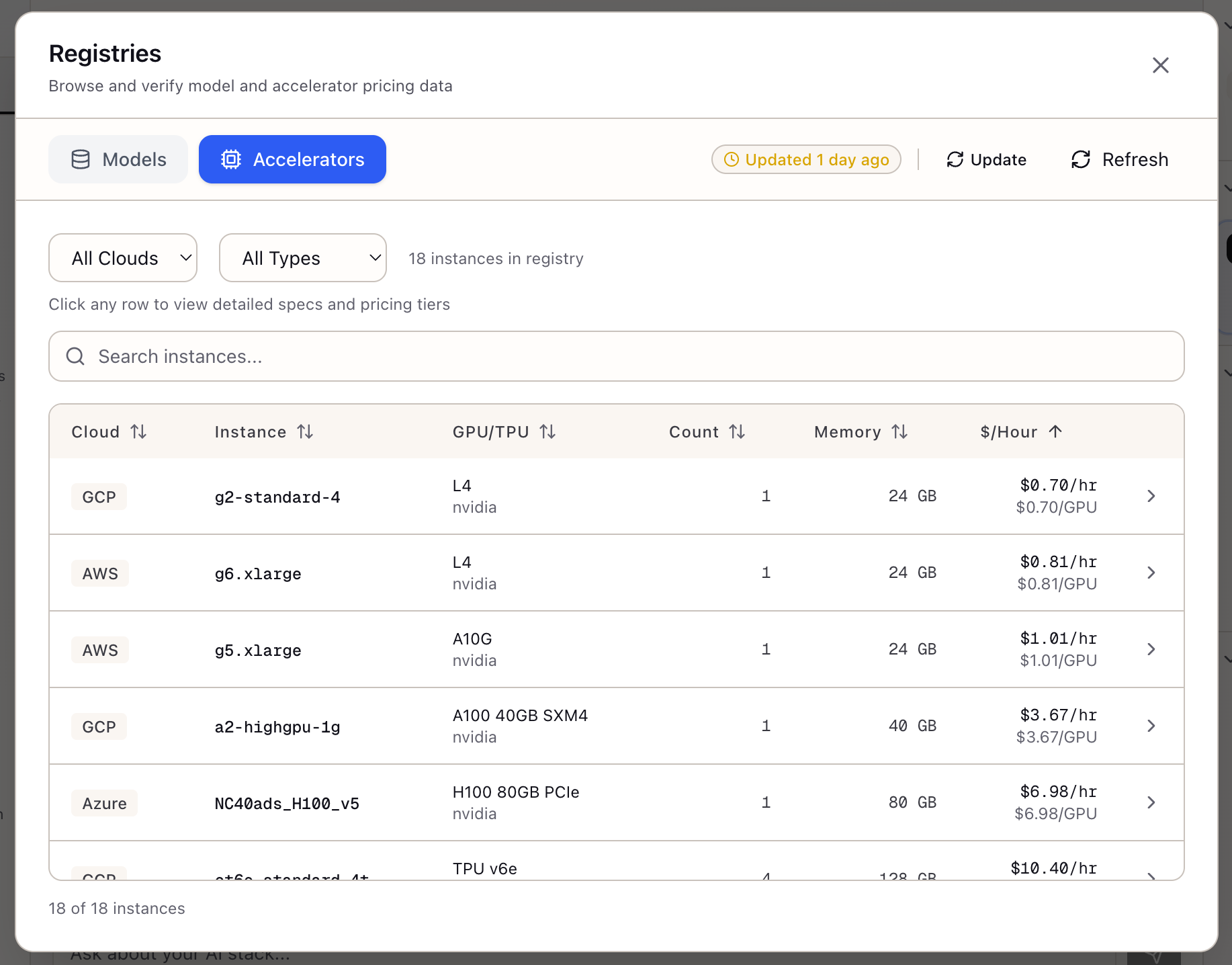
When I need to provision GPU infrastructure, I want to compare instances across cloud providers with consistent specs and pricing, so I can make informed hardware decisions without jumping between pricing pages.
The Challenge
You’re planning infrastructure for inference serving. H100 is the obvious choice for performance, but what’s the actual hourly rate on AWS vs GCP? What’s the spot discount? Does Azure even have H100 availability in your region? The answers are scattered across three different cloud pricing pages, each with different naming conventions (p5 vs a3 vs ND H100 v5) and different pricing structures.
The comparison gets more complex when you factor in alternative accelerators. Maybe A100 is sufficient and 30% cheaper. Maybe L4 instances at 1/4 the cost give you 60% of the throughput—better economics for your batch workload. TPUs might be compelling for training, but good luck comparing TPU v5e pricing to GPU pricing in the same spreadsheet.
Platform teams spend hours assembling pricing spreadsheets that go stale within weeks. Cloud providers update prices, add instance types, and change spot availability without notification. Your carefully researched cost model becomes inaccurate, and infrastructure decisions based on old data waste money.
How Lattice Helps
The Accelerator Registry consolidates GPU and TPU instances from AWS, GCP, and Azure into a single browsable interface. Instead of jumping between pricing pages, you filter by cloud provider, accelerator type, or memory requirements and see standardized specifications with multi-tier pricing.
The registry doesn’t just show hourly rates. It includes on-demand, spot, 1-year reserved, and 3-year reserved pricing with savings percentages calculated. You see per-instance and per-GPU costs, making it easy to compare a 4-GPU A100 instance against an 8-GPU H100 instance on equivalent terms.
Browsing Instances
The Accelerator Table:
The main view shows a sortable, filterable table:
| Cloud | Instance Type | GPU | Count | Total Memory | $/hour |
|---|---|---|---|---|---|
| AWS | p5.48xlarge | H100 | 8 | 640 GB | $98.32 |
| GCP | a3-highgpu-8g | H100 | 8 | 640 GB | $101.20 |
| Azure | ND H100 v5 | H100 | 8 | 640 GB | $105.48 |
| AWS | p4d.24xlarge | A100 40GB | 8 | 320 GB | $32.77 |
| AWS | p4de.24xlarge | A100 80GB | 8 | 640 GB | $40.97 |
Filtering Options:
- Cloud Provider: AWS, GCP, Azure
- Accelerator Type: H100, A100, L4, T4, TPU v5e, etc.
- Search: Filter by instance name or GPU model
Viewing Instance Details
Click any row to open the detail panel with comprehensive specifications.
Compute Specifications:
| Spec | Value |
|---|---|
| vCPUs | 192 |
| System Memory | 2048 GB |
| Total GPU Memory | 640 GB |
| Local Storage | 8x 3.84 TB NVMe |
| Network Bandwidth | 3200 Gbps ENA |
Pricing Tiers:
| Tier | Per Instance | Per GPU | Savings |
|---|---|---|---|
| On-Demand | $98.32/hr | $12.29/hr | - |
| Spot | $34.41/hr | $4.30/hr | 65% |
| 1-Year Reserved | $63.91/hr | $7.99/hr | 35% |
| 3-Year Reserved | $44.16/hr | $5.52/hr | 55% |
Comparing Across Clouds
The registry makes cross-cloud comparison straightforward.
H100 8-GPU Instances:
| Cloud | Instance | On-Demand | Spot | 3-Year |
|---|---|---|---|---|
| AWS | p5.48xlarge | $98.32 | $34.41 | $44.16 |
| GCP | a3-highgpu-8g | $101.20 | $35.42 | $45.54 |
| Azure | ND H100 v5 | $105.48 | $36.92 | $47.47 |
Insight: AWS is cheapest for H100 across all pricing tiers. For continuous workloads, 3-year reserved saves 55% vs on-demand.
Coverage
AWS Instances:
- H100: p5.48xlarge
- A100 40GB: p4d.24xlarge
- A100 80GB: p4de.24xlarge
- L4: g6.xlarge through g6.48xlarge
- A10G: g5.xlarge through g5.48xlarge
- T4: g4dn.xlarge through g4dn.metal
- Trainium: trn1.2xlarge through trn1n.32xlarge
- Inferentia: inf2.xlarge through inf2.48xlarge
GCP Instances:
- H100: a3-highgpu-8g
- A100 40GB: a2-highgpu-1g through a2-megagpu-16g
- A100 80GB: a2-ultragpu-1g through a2-ultragpu-8g
- L4: g2-standard-4 through g2-standard-96
- TPU v5e: tpu-v5e-1 through tpu-v5e-256
- TPU v5p: tpu-v5p-8 through tpu-v5p-512
Azure Instances:
- H100: ND H100 v5
- A100 80GB: ND A100 v4
- A100 40GB: NC A100 v4
- A10: NV A10 v5
- T4: NC T4 v3
Real-World Scenarios
A platform team standardizing infrastructure browses the registry to establish approved instance types. They filter by cloud (AWS—their primary provider), sort by price, and identify that g6.xlarge (L4) at $0.81/hour offers the best cost/performance for their inference workloads.
A research scientist planning training compares A100 80GB options across clouds. GCP’s a2-ultragpu-8g at $37.53/hour beats AWS’s p4de.24xlarge at $40.97/hour—saving $3.44/hour or $2,500/month for continuous training.
An ML engineer evaluating TPUs browses GCP’s TPU v5e instances alongside GPU options. They compare TPU v5e-16 ($12.80/hour for 16 chips) against 2x A100 instances ($75/hour for similar throughput). The 6x cost difference makes TPUs compelling for their training workload.
What You’ve Accomplished
You now have a unified view of cloud GPU infrastructure:
- Compare instances across AWS, GCP, and Azure with consistent specs
- See all pricing tiers (on-demand, spot, reserved) in one view
- Calculate per-GPU costs for fair comparison
- Check spot availability before committing
What’s Next
The Accelerator Registry integrates with Lattice’s planning tools:
- TCO Calculator: Pull current GPU pricing into cost analysis
- Memory Calculator: Reference GPU memory specs for training planning
- Spot Instance Advisor: Use spot pricing and availability data
- Stack Configuration: Select instance types for infrastructure stacks
Accelerator Registry is available in Lattice. Make hardware decisions with current, comparable data.
Ready to Try Lattice?
Get lifetime access to Lattice for confident AI infrastructure decisions.
Get Lattice for $99