
Exploring the Blueprint Gallery
When I start a new research project, I want to quickly populate my workspace with relevant sources, so I can begin analysis immediately without hunting for documentation.
Introduction
Starting a new infrastructure research project means hunting down vendor documentation, pricing pages, and benchmark data before you can even begin analysis. This setup tax compounds across projects—every time you research a new topic, you repeat the same ritual of bookmark hunting and URL pasting.
Blueprints eliminate this friction. A single blueprint can populate your workspace with curated sources, pre-configured scenarios, and recommended stacks—all indexed and ready for research.
The Blueprint Gallery
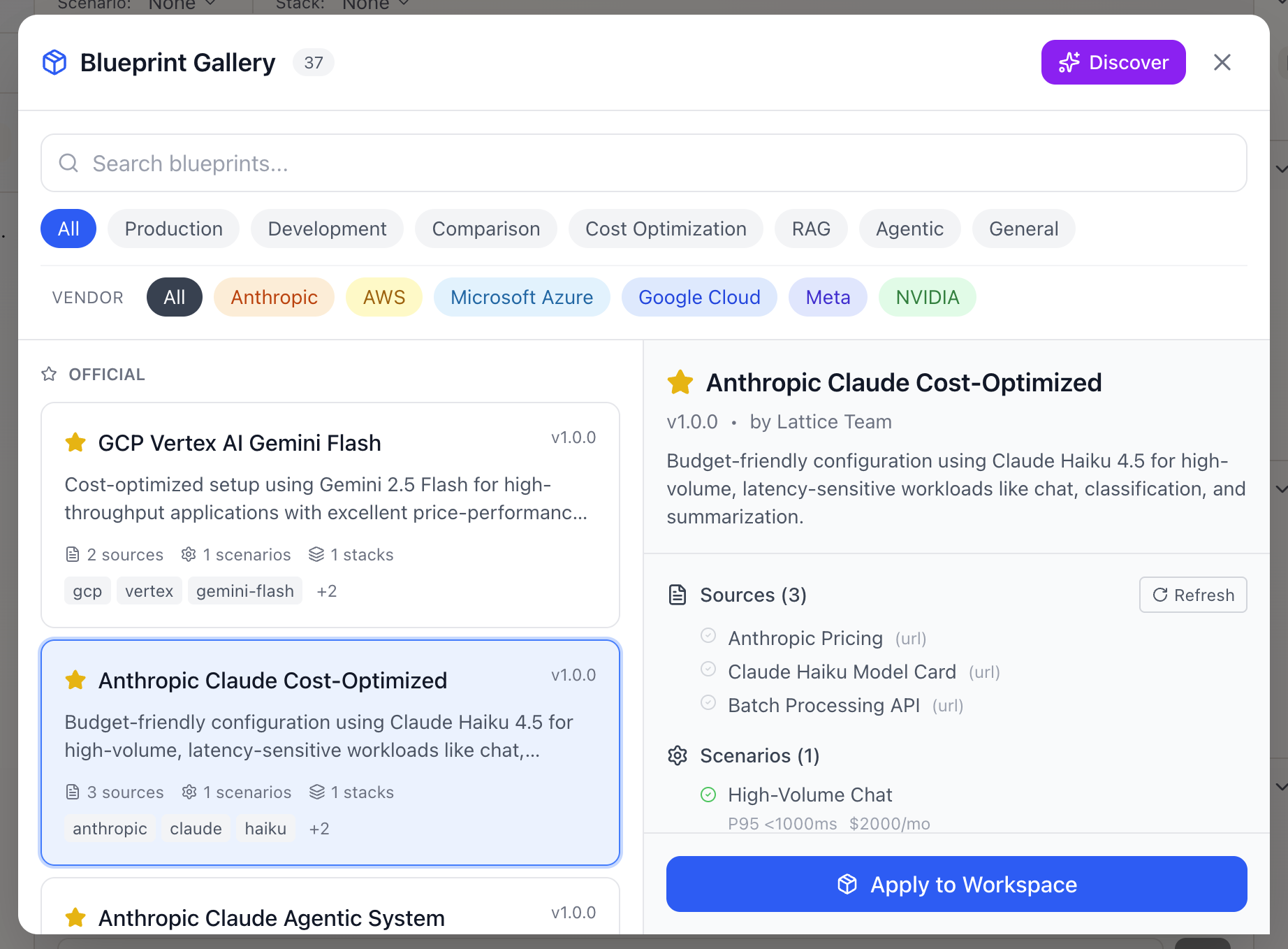
The Blueprint Gallery is your starting point for rapid workspace setup. Access it by clicking “Blueprints” in the Sources panel or using the keyboard shortcut.
Gallery Sections
Official Blueprints (curated by Lattice):
- Quality-assured and regularly updated
- Cover major providers and common use cases
- Include verified, working URLs
Community Blueprints (user-contributed):
- Shared by other researchers
- Community ratings surface the best ones
- Diverse use cases beyond official coverage
Your Blueprints (private):
- Blueprints you’ve created or saved
- Export your workspace setup for reuse
- Share with team members
Blueprint Categories
| Category | Description | Examples |
|---|---|---|
| production | Production deployment patterns | ”Anthropic Production”, “OpenAI Enterprise” |
| development | Development and testing setups | ”Local Development Stack” |
| comparison | Provider/model comparisons | ”Multi-Provider Comparison” |
| cost_optimization | Budget-focused configurations | ”Cost-Effective RAG” |
| rag | RAG pipeline patterns | ”RAG Best Practices” |
| agentic | Agentic system configurations | ”LangGraph Agents” |
Filtering Options
- By category: Find blueprints for your use case
- By vendor: Focus on a specific provider ecosystem (Anthropic, OpenAI, AWS, Google)
- By search: Full-text search across names and descriptions
What’s in a Blueprint
Each blueprint card shows:
- Name and description: What problem it solves
- Source count: How many documents included
- Scenario count: Pre-configured workload definitions
- Stack count: Recommended configurations
- Tags: Category and vendor identifiers
Blueprint Contents
Sources: Documentation URLs that will be fetched, chunked, and indexed:
- Vendor pricing pages
- API documentation
- Best practices guides
- Model specifications
Scenarios: Pre-configured workload definitions:
- Workload type (chat, RAG, agentic)
- Performance SLOs (latency, throughput)
- Budget constraints
- Compliance requirements
Stacks: Recommended configurations:
- Provider and model selection
- Framework choices
- Temperature and parameter defaults
Applying a Blueprint
Click “Apply to Workspace” to import the blueprint contents:
- Review the items: Check/uncheck specific sources, scenarios, or stacks
- Understand the impact: See how many new sources will be indexed
- Confirm application: Click “Apply” to start the import
Within 30-60 seconds, your workspace is populated with indexed, searchable sources. The Research Agent immediately has context for answering your questions.
Real-World Use Cases
Starting a provider evaluation: Apply “Multi-Provider Comparison” and immediately begin asking questions about pricing, latency guarantees, and feature differences across Anthropic, OpenAI, and Google.
Setting up a team workspace: Apply “RAG Best Practices” to establish a knowledge foundation with chunking strategy documentation, embedding model comparisons, and retrieval pattern guides.
Transitioning projects: Export your current workspace as a blueprint before context-switching. When you return—or when a colleague picks up the project—apply the blueprint to reconstruct the research environment.
What’s Next
The Blueprint system integrates with Lattice’s evolving capabilities:
- Blueprint Discovery: AI-powered suggestions based on your research questions
- Blueprint Refresh: Automatically re-fetch URLs to get updated documentation
- Blueprint Versioning: Track changes and diff blueprint updates
Related journeys:
- apply-blueprint: Step-by-step walkthrough of applying blueprints
- browse-blueprints: Deep exploration by category
- discover-blueprint: AI-powered blueprint suggestions
Blueprint Gallery is available in Lattice 0.6.0. Skip the setup and start researching immediately with curated knowledge bundles.
Ready to Try Lattice?
Get lifetime access to Lattice for confident AI infrastructure decisions.
Get Lattice for $99