
Accessing the Private GitHub Repository
When I become a paying Lattice customer, I want to access the private GitHub repository, so I can follow the development roadmap, track upcoming features, and report issues that influence product direction.
Introduction
At Lattice, we believe in transparent development. Every paying customer gets direct access to our private GitHub repository—not just to view the code, but to actively participate in shaping the product’s future. You can follow our roadmap, see exactly what features are in development, and report issues that directly influence what we build next.
This guide shows you how to navigate the Lattice GitHub repository and make the most of your customer access.
Getting Repository Access
When you subscribe to Lattice, you’ll receive an invitation to the private navam-io/lattice repository on GitHub. Accept the invitation using your GitHub account, and you’ll have immediate access to:
- Source code — The complete Lattice codebase
- Project roadmap — Our GitHub Projects board with planned features
- Issue tracker — Bug reports and feature requests
- Discussions — Community conversations with the team
Following the Lattice Roadmap
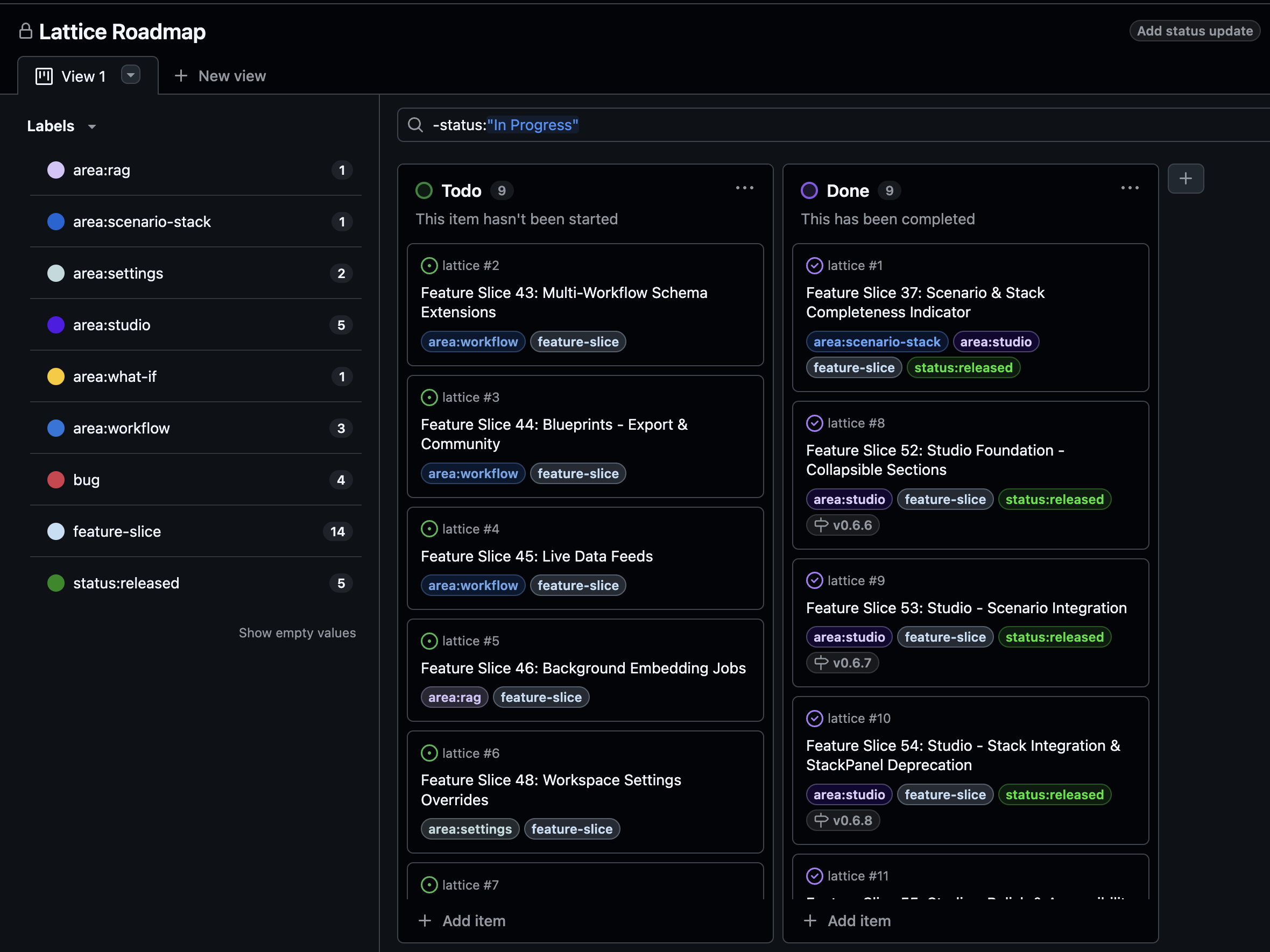
The Lattice Roadmap is maintained as a GitHub Projects board, giving you a clear view of what’s coming next. The board is organized into columns:
- Todo — Features that are planned but not yet started
- In Progress — Features currently being developed
- Done — Completed features with their release versions
Understanding Labels
The left sidebar shows labels that help you filter the roadmap by area of interest:
| Label | Description |
|---|---|
area:rag | Features related to RAG and knowledge retrieval |
area:scenario-stack | Scenario and stack configuration features |
area:settings | Application settings and preferences |
area:studio | Studio panel and artifact features |
area:what-if | What-if analysis capabilities |
area:workflow | Workflow automation features |
bug | Bug fixes and corrections |
feature-slice | Major feature implementations |
status:released | Features that have shipped |
Click any label to filter the board and see only relevant items.
Exploring Feature Details
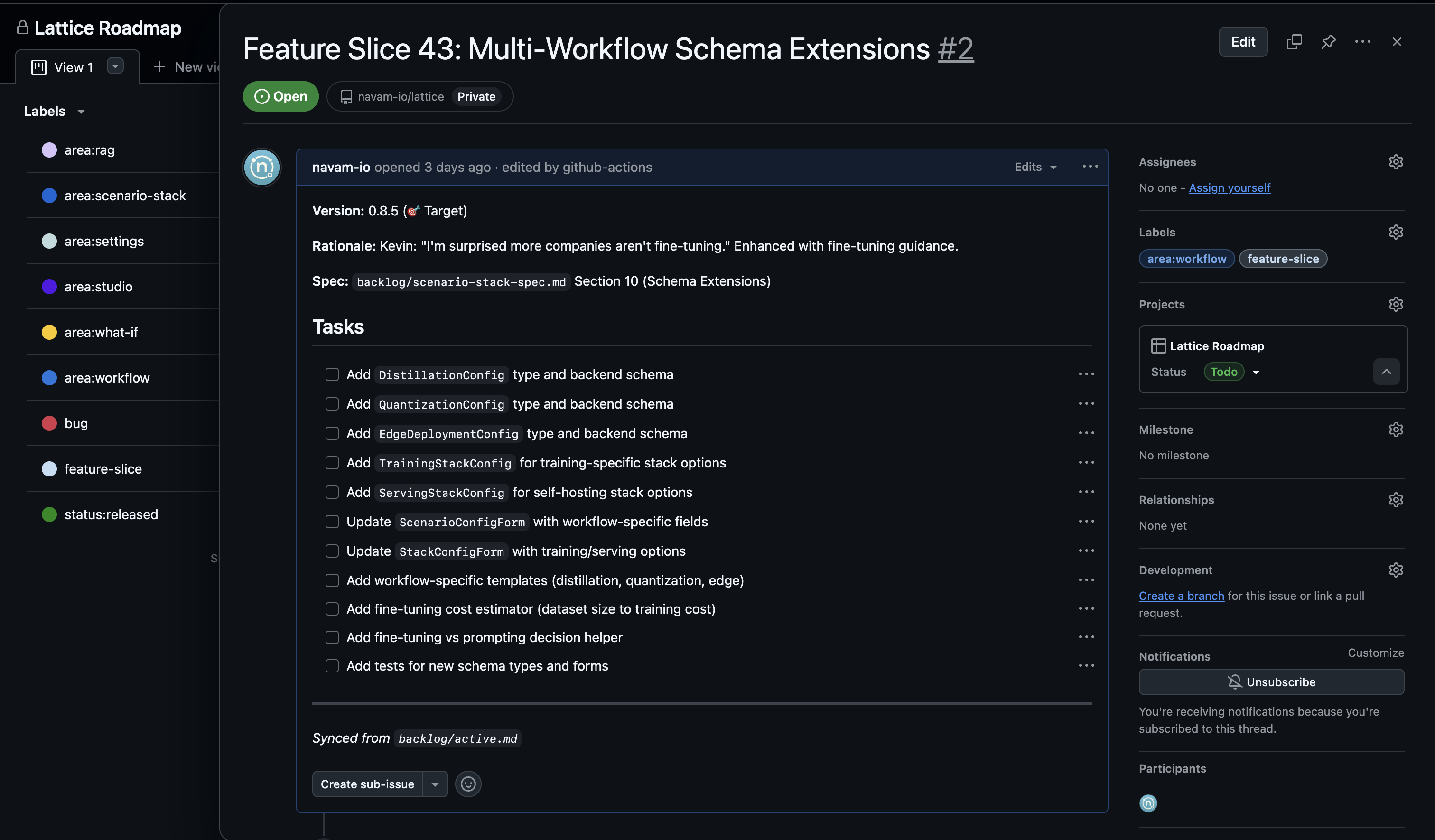
Each roadmap item links to a detailed GitHub issue. Opening an issue reveals:
Version Targeting
Every feature shows its target version (e.g., “Version: 0.8.5”) so you know which release will include it.
Rationale
We include the reasoning behind each feature—often with quotes from customer conversations. This transparency helps you understand why certain features are prioritized.
Detailed Task Lists
Each feature breaks down into specific implementation tasks with checkboxes. You can see exactly what work remains before a feature ships.
Spec References
Features link to specification documents (e.g., backlog/scenario-stack-spec.md) where you can read the full technical design.
Reporting Issues
Your feedback directly influences the Lattice roadmap. To report an issue:
- Navigate to Issues — Click the “Issues” tab in the repository
- Check for Duplicates — Search existing issues to avoid duplicates
- Create New Issue — Click “New issue” and select the appropriate template
- Provide Details — Include steps to reproduce, expected behavior, and screenshots
Issue Templates
We provide templates for:
- Bug Report — Something isn’t working as expected
- Feature Request — A capability you’d like to see added
- Documentation — Improvements to docs or guides
What Makes a Good Issue
The best issues include:
- Clear title — Summarize the problem or request
- Reproduction steps — How can we see the issue?
- Expected vs. actual — What should happen vs. what does happen?
- Context — Your use case and why this matters to you
- Screenshots — Visual evidence when applicable
Influencing the Roadmap
Your issues don’t disappear into a void. Here’s how customer feedback shapes development:
- Triage — We review every issue within 48 hours
- Labeling — Issues get categorized by area and priority
- Roadmap Integration — High-impact requests become feature slices
- Version Planning — Features are scheduled into upcoming releases
- Release Notes — You’ll see your influence reflected in shipped versions
Customers who actively participate often see their requested features prioritized. The rationale sections in our feature specs frequently reference customer conversations.
Staying Updated
Watch the Repository
Click “Watch” on the repository to receive notifications about:
- New releases
- Issue updates
- Roadmap changes
- Important announcements
Release Tags
Each version is tagged in Git (e.g., v0.6.6, v0.6.7, v0.6.8). You can see exactly what changed between versions and track the features you’re waiting for.
Notifications
Subscribe to specific issues by clicking “Subscribe” in the sidebar. You’ll be notified when:
- The issue status changes
- New comments are added
- The issue is closed or released
What You’ve Gained
As a paying Lattice customer, you now have:
- Full transparency — See exactly what we’re building and why
- Direct influence — Your issues shape the product roadmap
- Early visibility — Know what’s coming before it ships
- Community access — Connect with other Lattice users and the team
This isn’t just repository access—it’s a seat at the table for product development.
Next steps: Explore the roadmap, find features you’re excited about, and don’t hesitate to open issues for bugs or requests. Your input makes Lattice better for everyone.
Ready to Try Lattice?
Get lifetime access to Lattice for confident AI infrastructure decisions.
Get Lattice for $99