
When Stale Data Costs You Real Money: Live Data Feeds for AI Infrastructure
When I need accurate cost estimates for AI infrastructure decisions, I want to have access to current pricing and benchmark data, so I can make decisions based on reality rather than outdated documentation.
Introduction
You’re presenting a cost estimate to finance. The numbers look solid—$15,000/month for Claude Sonnet API calls at $0.003 per 1K input tokens. Except Anthropic changed their pricing two weeks ago and you didn’t notice. Your estimate is now 20% off, and you’ve just committed to a budget that doesn’t reflect reality.
This scenario plays out constantly in AI infrastructure planning. Pricing changes happen without fanfare. New models launch and leapfrog incumbents on benchmarks. Rate limits get adjusted. The documentation you read last month is now outdated.
For ML platform leads and research engineers, the problem compounds across dimensions. You’re not tracking one provider—you’re tracking Anthropic, OpenAI, Google, AWS, Azure, Mistral, Cohere, and whoever else launches something interesting. Each has different pricing structures, different capability matrices, different rate limits.
How Lattice Helps
Live Data Feeds transforms Lattice from a static planning tool into a continuously updated knowledge base. Feeds automatically sync pricing, model cards, and benchmark data from AI providers, keeping your cost estimates accurate and your recommendations current.
When you run a TCO calculation, the numbers come from live pricing data—not hardcoded values from six months ago. When you compare models for a RAG workload, the benchmark rankings reflect recent data.
Live Data Feeds in Action
Feed Categories
Lattice supports five categories of live data:
Pricing Feeds:
- Model input/output token costs
- Context window sizes and max output tokens
- Batch pricing and volume discounts
- Providers: Anthropic, OpenAI, Google, AWS, Azure, Mistral, Cohere
Model Card Feeds:
- Capabilities (vision, tool use, streaming, extended thinking)
- Performance metrics and ELO ratings
- Rate limits (requests per minute, tokens per minute)
Benchmark Feeds:
- Overall ELO rankings
- Category-specific scores (coding, reasoning, instruction following)
- Sources: LMArena, Artificial Analysis, MLPerf
Documentation Feeds:
- API documentation and guides
- Best practices and tutorials
Status Feeds:
- Provider status pages
- Service availability and incident history
The Feeds Modal
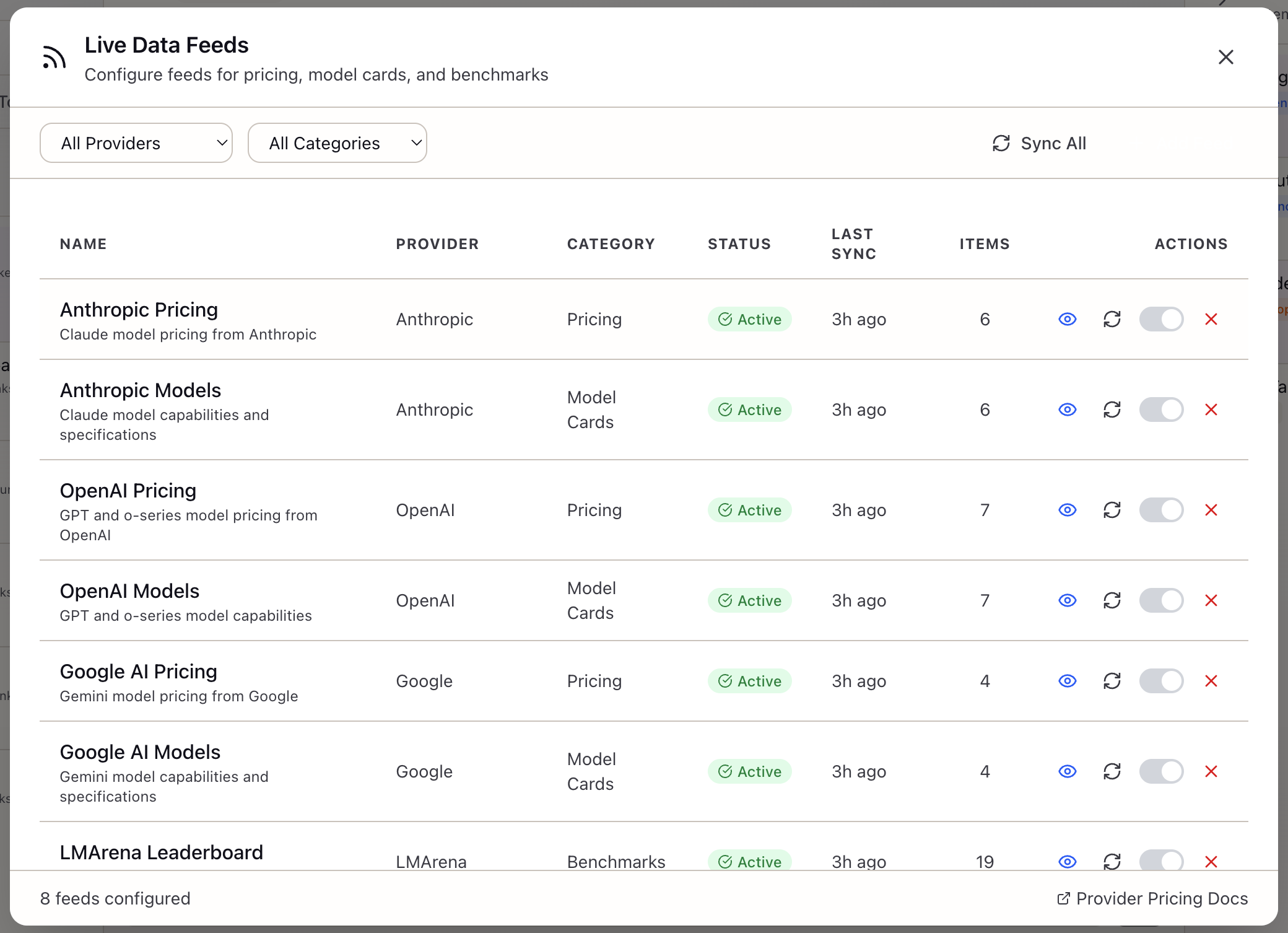
Access feeds from the Sources panel header—click the RSS icon labeled “Live Data Feeds”. The modal presents:
Feed List: Each feed shows:
- Provider name and category (Anthropic Pricing, LMArena Benchmarks, etc.)
- Status badge: Active (green), Paused (yellow), Error (red), Stale (gray)
- Last sync timestamp (“2h ago”, “1d ago”)
- Toggle to enable/disable
Sync Controls:
- “Sync All” button triggers refresh for all enabled feeds
- Individual sync button on each feed card
- Sync progress indicator during refresh
How Feeds Power Other Features
TCO Calculator: When you run a cost comparison, the calculator checks for live pricing data:
Estimated Monthly Cost: $3,200 Input tokens: 50M x $0.003/1k = $150 Output tokens: 200M x $0.015/1k = $3,000 Based on: Anthropic Pricing (updated 2h ago)Scenario Validation: When your scenario requires capabilities beyond a model’s limits, feeds provide accurate constraint data.
Stack Recommendations: When suggesting models for your workload, Lattice uses benchmark feeds to rank options by relevance to your use case.
Real-World Scenarios
The Quarterly Budget Review
A platform team is preparing Q2 budget projections. They’ve been using Claude Sonnet for production but want to evaluate alternatives. With live feeds:
- Sync all pricing feeds to ensure current data
- Run TCO comparison across Anthropic, OpenAI, and Google
- The calculator shows costs based on pricing updated within the last 24 hours
- Export the comparison with timestamps proving data currency
- Present to finance with confidence that numbers reflect reality
Evaluating a New Model Release
OpenAI releases GPT-4.5. Your team wants to know if it’s worth switching. With live feeds:
- The model card feed updates automatically with capabilities and limits
- Benchmark feeds show where GPT-4.5 ranks on LMArena within hours of public data
- Pricing feeds capture the new model’s cost structure
- Your TCO calculator already includes the new option
- You can make an informed decision while the model is still “new”
Auditing Cost Predictions
Six months after deployment, an audit asks: “Were your cost projections accurate?” With live feeds:
- Export the feed sync logs showing when data was refreshed
- Show the pricing data that was active when projections were made
- Compare predicted vs. actual costs with full provenance
What You’ve Accomplished
By using Live Data Feeds, you can now:
- Access current pricing data from all major AI providers
- Monitor model capabilities and benchmark rankings
- Ensure cost estimates reflect actual provider pricing
- Track when data was last updated for audit purposes
What’s Next
Related capabilities you might explore:
- TCO Calculator: Uses feed pricing for accurate cost projections
- Model Registry: Provides baseline model data that feeds augment
- Scenario Validation: Uses feed limits to check if your SLOs are achievable
Live Data Feeds is available in Lattice v0.9.6+. Click the RSS icon in the Sources panel to configure your feeds and start syncing current data.
Ready to Try Lattice?
Get lifetime access to Lattice for confident AI infrastructure decisions.
Get Lattice for $99