
Browsing the Model Registry
When I need to compare AI models for my project, I want to browse accurate pricing and capabilities in one place, so I can make informed decisions without hunting through multiple documentation sites.
The Challenge
It’s 2 AM and you’re debugging why your production system is hitting rate limits. Was it Claude Sonnet with the 4,000 RPM limit or was that GPT-4? You open Anthropic’s documentation, then OpenAI’s, then realize you’re not even sure which model supports the extended thinking feature you need.
For research engineers and platform leads, the fragmented state of model documentation is a constant tax on productivity. Pricing pages change without notice. Context windows expand silently. New capabilities appear. The mental model you built last month is already stale.
How Lattice Helps
The Model Registry is Lattice’s centralized database of model capabilities, constraints, and pricing. Instead of hunting through documentation, you browse a unified interface where every model is described with consistent fields: context window, pricing per million tokens, supported features, and provider-specific quirks.
The registry is integrated throughout Lattice—Stack Configuration, Research Agent, and cost estimates all pull from the same authoritative source.
Step 1: Open the Registry Viewer
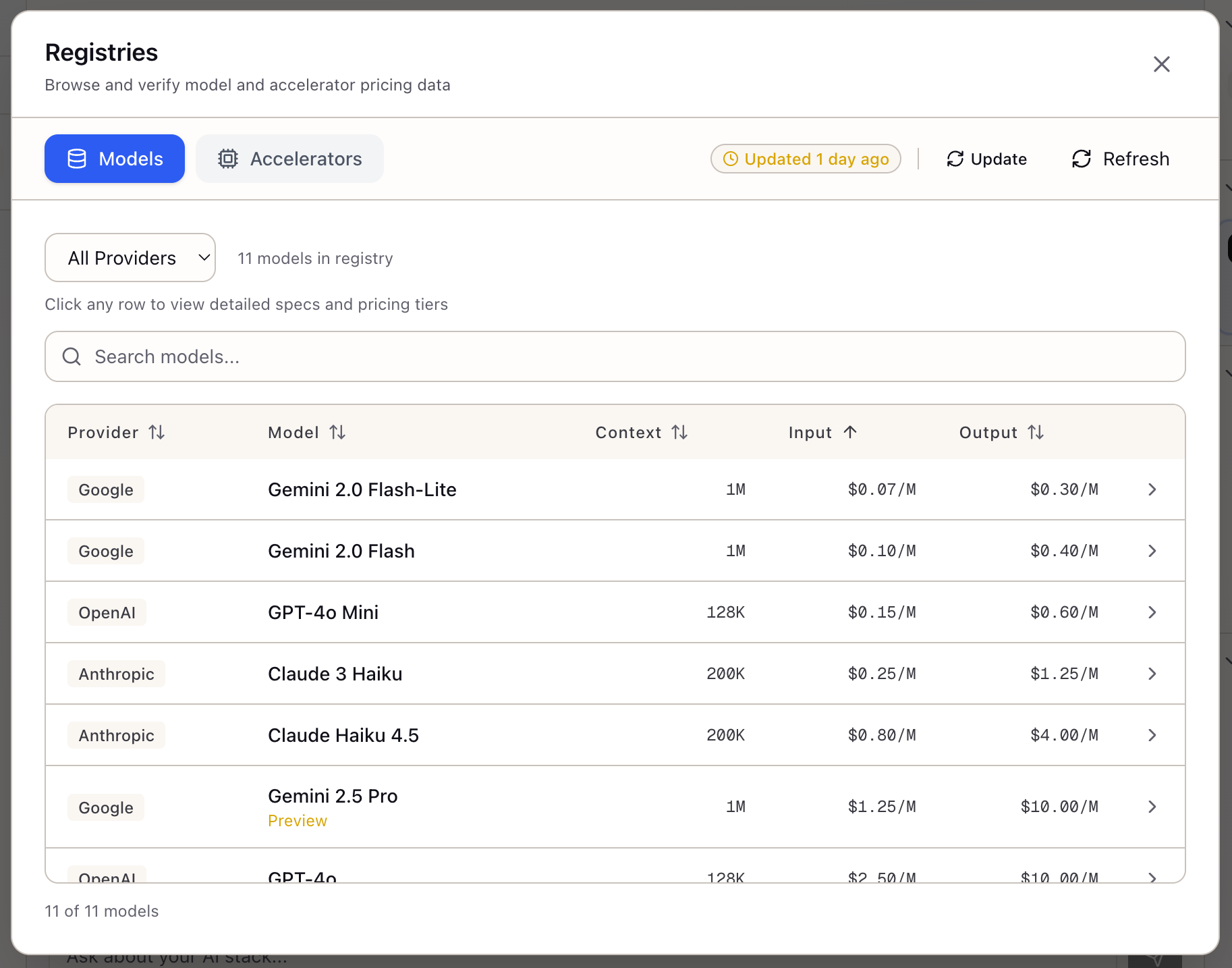
Click Registry Viewer in the Tools section of the Studio panel. The modal opens with tabs for Models and Accelerators.
The status badge shows when data was last synchronized:
- Green: Updated within 24 hours
- Yellow: Updated within 7 days
- Red: Data may be stale
The Models tab displays all registered models in a sortable table:
| Column | Description |
|---|---|
| Provider | Anthropic, OpenAI, Google, etc. |
| Model | Display name with preview badge for new models |
| Context | Context window in tokens |
| Input | Price per million input tokens |
| Output | Price per million output tokens |
Click any column header to sort. Default sort is by input price (cheapest first), making cost comparison immediate.
Step 2: Filter by Provider
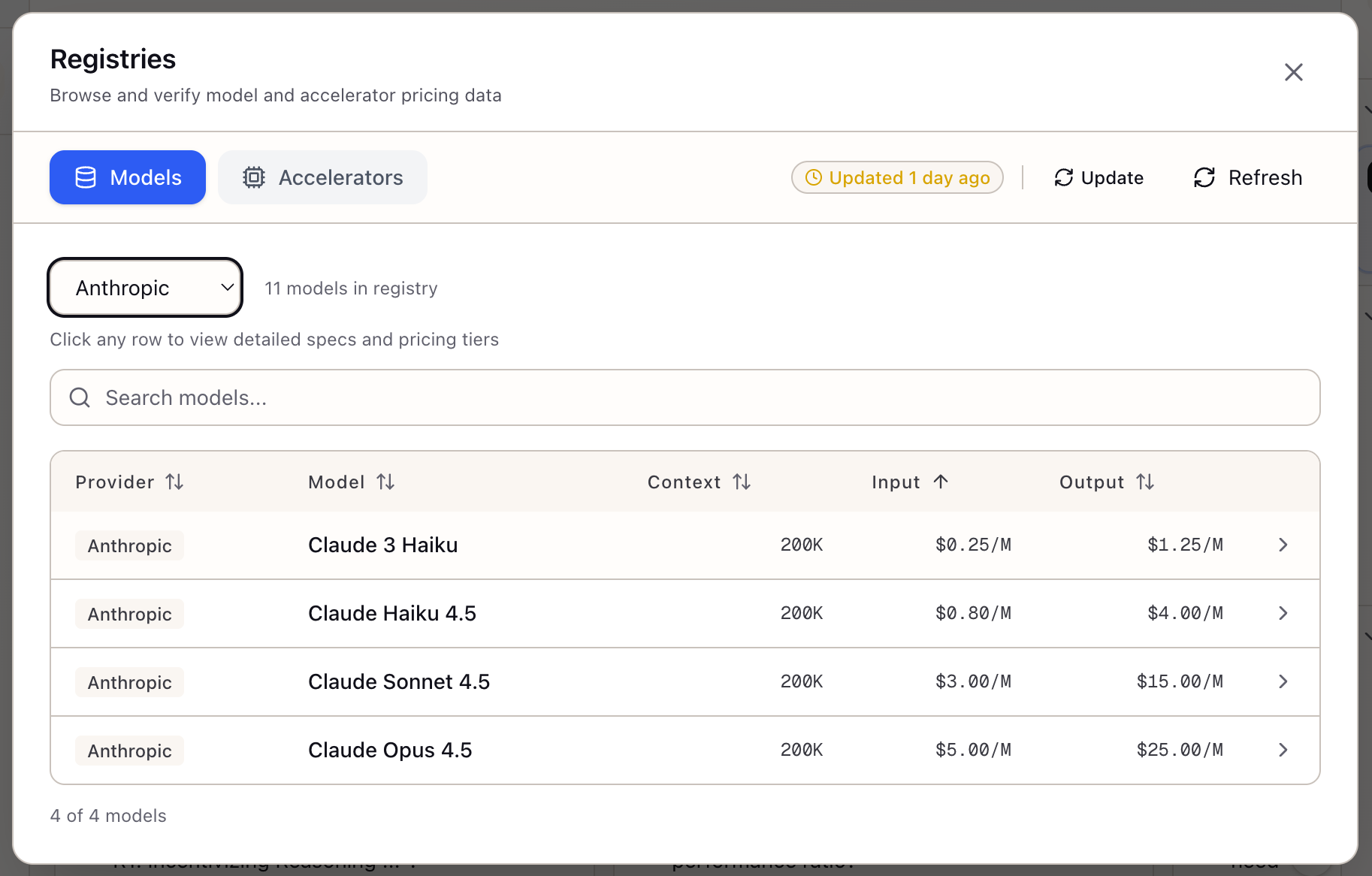
Use the Provider dropdown to filter to a specific vendor. The example shows Anthropic models filtered:
| Model | Context | Input/1M | Output/1M |
|---|---|---|---|
| Claude 3 Haiku | 200K | $0.25 | $1.25 |
| Claude Haiku 4.5 | 200K | $0.80 | $4.00 |
| Claude Sonnet 4.5 | 200K | $3.00 | $15.00 |
| Claude Opus 4.5 | 200K | $5.00 | $25.00 |
Use the Search input for real-time filtering by name, provider, or model ID.
Step 3: View Model Details
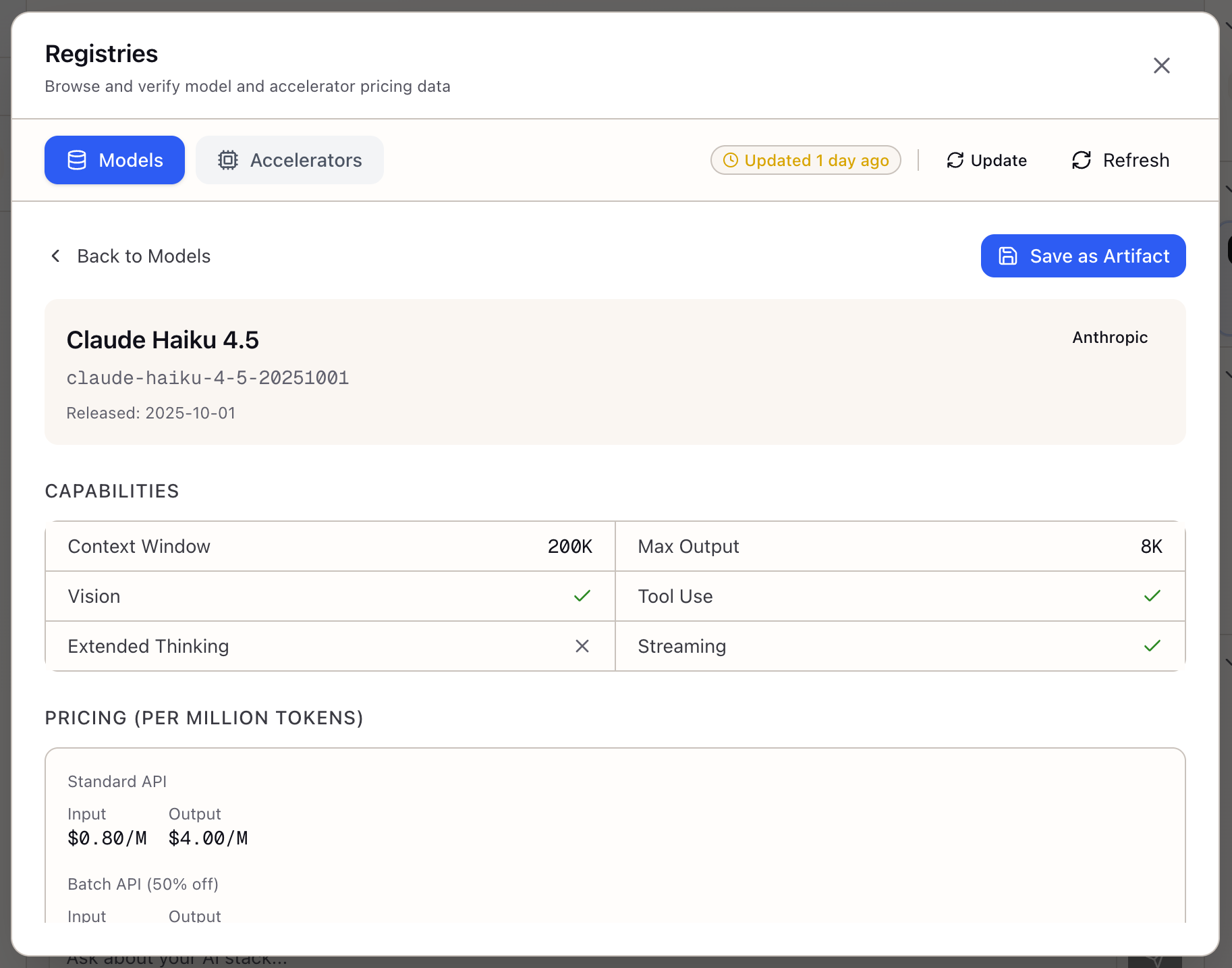
Click any row to open the model detail panel showing comprehensive information:
Header:
- Model name and ID (e.g.,
claude-haiku-4-5-20251001) - Provider badge
- Release date
Capabilities Grid:
| Capability | Description |
|---|---|
| Context Window | Maximum input tokens (200K) |
| Max Output | Maximum response tokens (8K) |
| Vision | Image input support |
| Tool Use | Function calling capability |
| Extended Thinking | Reasoning support |
| Streaming | Response streaming support |
Pricing (Per Million Tokens):
| Tier | Input | Output |
|---|---|---|
| Standard API | $0.80/M | $4.00/M |
| Batch API (50% off) | $0.40/M | $2.00/M |
Click Save as Artifact to preserve model specs for your documentation.
Models in the Registry
Google (Gemini):
| Model | Context | Input/1M | Output/1M |
|---|---|---|---|
| Gemini 2.0 Flash-Lite | 1M | $0.07 | $0.30 |
| Gemini 2.0 Flash | 1M | $0.10 | $0.40 |
| Gemini 2.5 Pro | 1M | $1.25 | $10.00 |
OpenAI (GPT):
| Model | Context | Input/1M | Output/1M |
|---|---|---|---|
| GPT-4o Mini | 128K | $0.15 | $0.60 |
| GPT-4o | 128K | $2.50 | $10.00 |
Anthropic (Claude):
| Model | Context | Input/1M | Output/1M |
|---|---|---|---|
| Claude 3 Haiku | 200K | $0.25 | $1.25 |
| Claude Haiku 4.5 | 200K | $0.80 | $4.00 |
| Claude Sonnet 4.5 | 200K | $3.00 | $15.00 |
| Claude Opus 4.5 | 200K | $5.00 | $25.00 |
Integration Throughout Lattice
The registry powers features across the application:
- Stack Configuration: Model dropdowns show pricing and context inline
- Research Agent: Responses cite current pricing when recommending models
- Smart Defaults: Temperature and token limits adapt to each model’s constraints
- Cost Estimates: TCO calculations pull live pricing from the registry
What You’ve Accomplished
You now have a centralized reference that:
- Shows accurate, up-to-date model pricing and capabilities
- Enables quick cost comparison across providers
- Provides detailed capability information for each model
- Integrates with Stack configuration for informed decisions
What’s Next
With model capabilities understood, explore these related features:
- Create a Stack: Select your model and configure your infrastructure
- Accelerators Tab: Browse GPU specs and cloud pricing
- Research Agent: Ask questions grounded in registry data
Model Registry is available in Lattice. Browse models with accurate pricing and capabilities in one place.
Ready to Try Lattice?
Get lifetime access to Lattice for confident AI infrastructure decisions.
Get Lattice for $99