
Parallelism Strategy Advisor
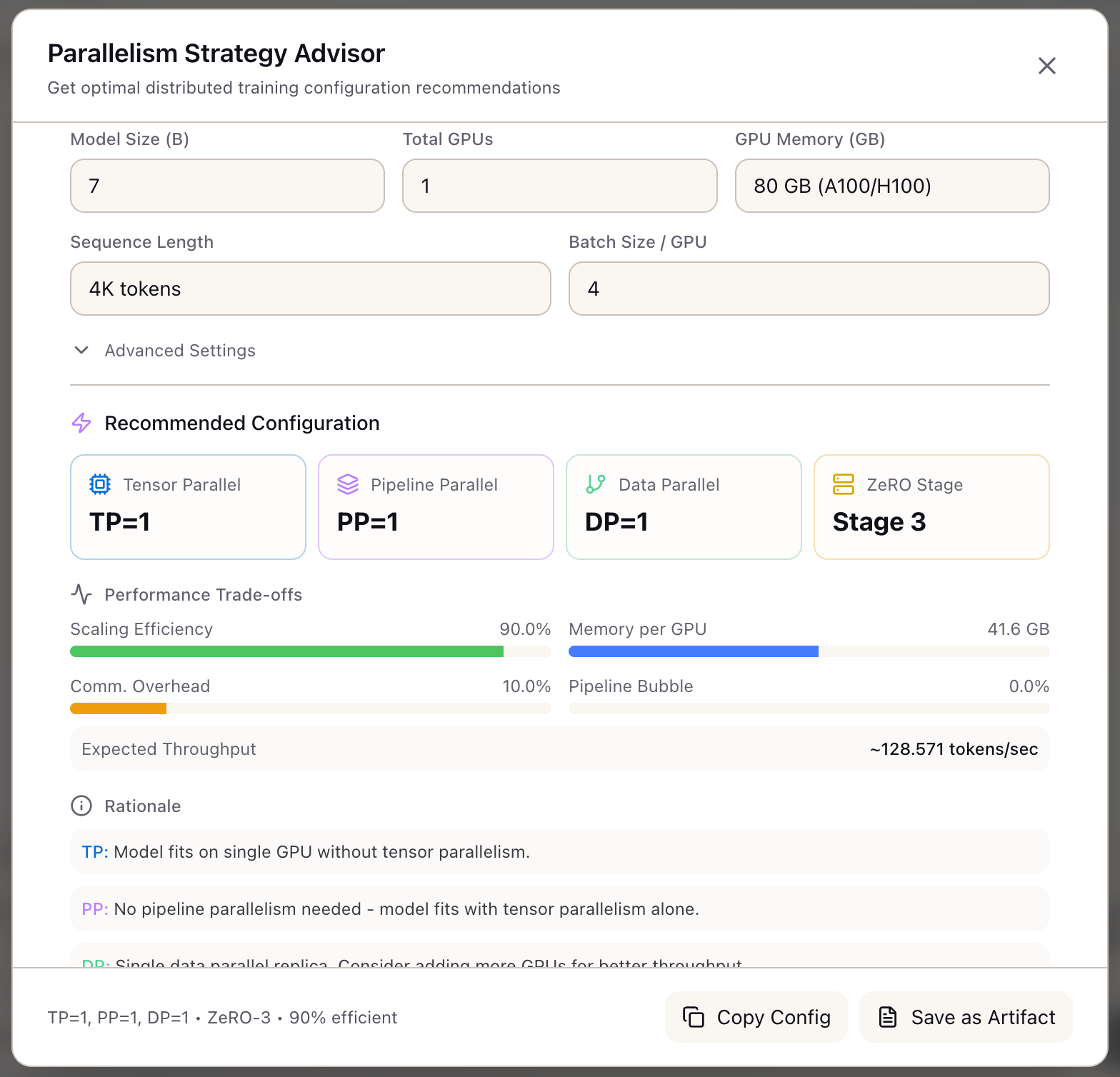
When I need to configure distributed training for a large model, I want to get automated parallelism recommendations, so I can avoid OOM errors and maximize GPU utilization without trial and error.
The Challenge
Distributed training configuration is one of the most complex decisions in the ML infrastructure stack. You have 32 H100 GPUs and a 70B model to train. Do you use Tensor Parallelism, Pipeline Parallelism, Data Parallelism, or some combination? What about ZeRO stages? Context Parallelism for long sequences?
The right answer depends on a cascade of interacting factors: model size, GPU memory, interconnect bandwidth, sequence length, and batch size. Choose poorly and you either run out of memory, waste 40% of your compute on communication overhead, or introduce pipeline bubbles that tank throughput.
Most teams solve this by hiring expensive ML infrastructure engineers or copying configurations from public training runs that may not match their setup. Even experienced engineers often resort to trial and error: run training, hit OOM, adjust parallelism, repeat.
How Lattice Helps
The Parallelism Advisor encodes the HuggingFace Ultrascaling Playbook’s decision tree into an automated recommendation engine. Instead of manually reasoning through TP vs PP vs ZeRO trade-offs, you describe your training setup and receive optimal parallelism settings with detailed rationale.
The advisor doesn’t just output numbers. It explains why each parallelism degree was chosen, quantifies the trade-offs (communication overhead, pipeline bubbles, memory utilization), and generates ready-to-use configuration files for DeepSpeed, FSDP, and Nanotron.
Configuring Your Training Setup
Required Inputs:
| Input | Description | Range |
|---|---|---|
| Model Size | Parameters in billions | 0.1B - 10T |
| GPU Count | Total GPUs in cluster | 1 - 16,384 |
| GPU Memory | Per-GPU memory in GB | 8 - 320 |
Optional Inputs:
| Input | Default | Description |
|---|---|---|
| Sequence Length | 4096 | Context window for training |
| Batch Size | 4 | Micro-batch size per GPU |
| Interconnect | nvlink | nvlink, infiniband, or pcie |
| GPUs per Node | 8 | For multi-node calculations |
| Training Type | pretrain | pretrain, finetune, or rlhf |
Understanding the Recommendations
Parallelism Values:
The advisor displays recommended values for each parallelism dimension:
- TP (Tensor Parallelism): Splits model layers across GPUs within a node. Capped at 8 to stay within NVLink bandwidth.
- PP (Pipeline Parallelism): Splits layers across pipeline stages for multi-node training.
- DP (Data Parallelism): Replicates model across GPU groups with gradient averaging.
- ZeRO Stage: Optimizer/gradient/parameter sharding (0-3).
- CP (Context Parallelism): Ring Attention for sequences > 32K tokens.
- SP (Sequence Parallelism): Shards LayerNorm/Dropout with TP > 1.
Trade-off Metrics:
| Metric | What It Measures |
|---|---|
| Memory per GPU | Effective memory after sharding |
| Communication Overhead | % of time spent in collective operations |
| Pipeline Bubble | % throughput lost to PP stage imbalance |
| Scaling Efficiency | Overall utilization (100 - overhead - bubble) |
| Expected Throughput | Estimated tokens/second |
The Decision Tree Algorithm
The advisor implements the Ultrascaling Playbook priority order:
Step 1: Tensor Parallelism (Memory Bound)
TP is always tried first because it directly addresses memory pressure. The cap at 8 reflects the NVLink topology within a DGX node.
Step 2: Pipeline Parallelism (Multi-Node)
PP activates only when training spans multiple nodes. It introduces pipeline bubbles but enables scaling beyond single-node memory limits.
Step 3: Data Parallelism (Throughput)
DP fills the remaining GPU capacity. It’s the most communication-efficient parallelism but doesn’t help with memory.
Step 4: ZeRO Stage Selection
ZeRO stages trade communication for memory. Stage 3 (full parameter sharding) is powerful but adds gather operations on every forward pass.
Framework Configuration Export
The advisor generates complete configuration files for three frameworks:
DeepSpeed Config:
{ "train_batch_size": 128, "train_micro_batch_size_per_gpu": 4, "gradient_accumulation_steps": 4, "zero_optimization": { "stage": 1, "reduce_scatter": true, "contiguous_gradients": true }, "bf16": { "enabled": true }}FSDP Config:
fsdp_config = { "sharding_strategy": "SHARD_GRAD_OP", "mixed_precision": "bf16", "use_orig_params": True, "activation_checkpointing": True}Nanotron Config:
parallelism: tp: 8 pp: 4 dp: 1 cp: 1 sp: trueWhat You’ve Accomplished
You now have parallelism recommendations that:
- Match the HuggingFace Ultrascaling Playbook methodology
- Explain the rationale behind each configuration choice
- Quantify performance trade-offs before you commit GPU hours
- Export ready-to-use configs for DeepSpeed, FSDP, and Nanotron
What’s Next
The Parallelism Advisor integrates with Lattice’s training intelligence suite:
- Memory Calculator: Verify GPU memory fits before applying parallelism recommendations
- Framework Configs: Export generated configs directly to training jobs
- Training Scenarios: Save parallelism settings as part of training scenario definitions
- TCO Calculator: Factor scaling efficiency into cost estimates
Parallelism Advisor is available in Lattice. Get expert-level distributed training recommendations without the expert.
Ready to Try Lattice?
Get lifetime access to Lattice for confident AI infrastructure decisions.
Get Lattice for $99