
Quantization Advisor
When I need to deploy a large model on limited GPU memory, I want to choose the optimal quantization method, so I can reduce memory usage while maintaining quality for my use case.
The Challenge
Your 70B model runs inference at 25 tokens/second on H100—acceptable for batch processing but too slow for interactive use cases. You’ve heard quantization can help: 4-bit models run faster and use 4x less memory. But which quantization method? AWQ, GPTQ, GGUF, FP8, INT8, bitsandbytes—each has different quality retention, speed characteristics, and serving engine compatibility.
The decision tree is complex. GGUF is great for Apple Silicon but won’t work with vLLM. FP8 preserves maximum quality but only works on H100/Ada GPUs. AWQ has excellent quality retention but requires calibration data. The wrong choice means either quality degradation that users notice or compatibility issues that block deployment.
Research engineers waste days testing different quantization methods, discovering incompatibilities, and benchmarking performance—only to find their calibration data wasn’t representative and quality dropped on real queries.
How Lattice Helps
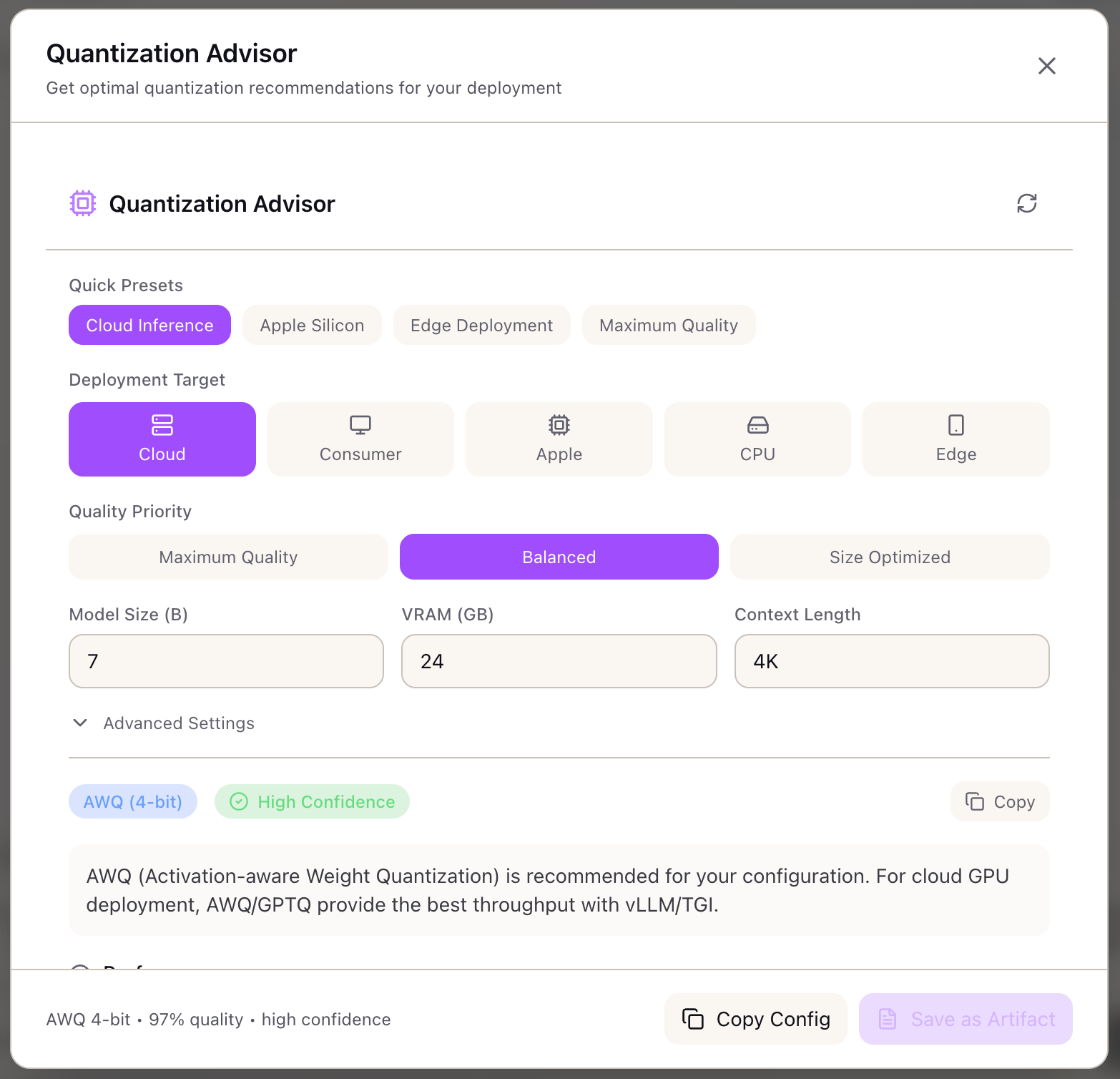
The Quantization Advisor matches your deployment constraints to the optimal quantization strategy. Instead of trial and error, you specify your target (cloud GPU, consumer GPU, Apple Silicon, CPU), quality priority (maximum, balanced, size-optimized), and serving engine (vLLM, TGI, Ollama)—and receive a specific recommendation with performance estimates.
The advisor doesn’t just recommend a method. It shows expected memory savings, speedup factor, quality retention percentage, and tokens/second projection. It validates that your model fits in available VRAM, provides calibration guidance, and suggests alternatives with trade-off comparisons.
Configuring Your Deployment
Deployment Target:
| Target | Best Methods | Use Case |
|---|---|---|
| Cloud GPU | AWQ, GPTQ, FP8 | A100, H100, L40S servers |
| Consumer GPU | AWQ, GPTQ, EETQ | RTX 4090, 3090 workstations |
| Apple Silicon | GGUF | M1/M2/M3 Mac deployment |
| CPU Only | GGUF | Server CPU inference |
| Edge Device | GGUF | Jetson, mobile, embedded |
Quality Priority:
| Priority | Typical Bits | Quality Retention |
|---|---|---|
| Maximum Quality | 6-8 bit | 99%+ |
| Balanced | 4-5 bit | 95-98% |
| Size Optimized | 2-4 bit | 90-95% |
Model Configuration:
- Model Size: Parameters in billions (e.g., 70 for Llama 70B)
- Available VRAM: GPU memory in GB (e.g., 80 for H100)
- Context Length: Target context window (e.g., 8192)
Understanding the Recommendations
Primary Recommendation:
Method: AWQ (4-bit)Confidence: High
Performance:- Quality Retention: 97%- Memory Savings: 75%- Speedup: 1.5x- Projected: 50 tokens/sec
Memory:- Model Size: 17.5 GB (vs 140 GB FP16)- Peak VRAM: 22.3 GB- KV Cache: 0.5 GB per 1K tokens- Fits on 80 GB: Yes
Serving Engine Compatibility:
| Engine | Compatible |
|---|---|
| vLLM | Yes |
| TGI | Yes |
| TensorRT-LLM | No |
| Ollama | No |
| llama.cpp | No |
| transformers | Yes |
Calibration Requirements:
Samples Needed: 128Calibration Time: ~15 minutesRepresentative Data: Use domain-specific prompts matching your production traffic distributionAlternative Methods:
| Alternative | Quality | Speedup | Memory | Trade-off |
|---|---|---|---|---|
| GPTQ 4-bit | 96% | 1.5x | 75% | Slightly lower quality, same speed |
| FP8 | 99.5% | 1.3x | 50% | Higher quality, less compression |
Method Selection Algorithm
The advisor uses a decision tree based on deployment constraints:
Step 1: Filter by Deployment Target
- Cloud GPU: AWQ, GPTQ, FP8, INT8, EETQ
- Consumer GPU: AWQ, GPTQ, EETQ, bitsandbytes
- Apple Silicon: GGUF
- CPU Only: GGUF
Step 2: Filter by Serving Engine
- vLLM: AWQ, GPTQ, FP8
- TGI: GPTQ, AWQ
- TensorRT-LLM: FP8, INT8
- Ollama: GGUF
- llama.cpp: GGUF
Step 3: Select Bit Width by Quality Priority
- Maximum: 6-8 bit (FP8, INT8)
- Balanced: 4-5 bit (AWQ, GPTQ 4-bit)
- Size Optimized: 2-4 bit (GGUF Q2/Q4, INT4)
Performance Estimates
| Method | Quality | Speedup | Memory |
|---|---|---|---|
| AWQ 4-bit | 97% | 1.5x | 75% reduction |
| GPTQ 4-bit | 96% | 1.5x | 75% reduction |
| GGUF Q4_K_M | 95% | 1.7x | 75% reduction |
| FP8 | 99.5% | 1.3x | 50% reduction |
| INT8 | 99% | 1.4x | 50% reduction |
| GGUF Q2_K | 90% | 2.0x | 87.5% reduction |
Real-World Scenarios
An ML engineer deploying Llama 70B to vLLM needs to fit the model on 2x A100 40GB with tensor parallelism. The Quantization Advisor recommends AWQ 4-bit: model size drops from 140 GB to 35 GB (fits in 80 GB total VRAM), quality retention is 97%, and speedup is 1.5x.
A startup deploying on-device inference targets M2 MacBook Pro (32 GB unified memory). The advisor recommends GGUF Q4_K_M: compatible with Ollama and llama.cpp, 75% memory reduction fits a 13B model, and the MLX backend provides 40 tps on Apple Silicon.
A platform team optimizing for cost wants maximum throughput for batch embedding generation. They select “size optimized” priority and get GGUF Q2_K recommendation: 87.5% memory reduction enables running 4x more concurrent requests per GPU.
An enterprise with H100 fleet prioritizes quality for customer-facing generation. The advisor recommends FP8: 99.5% quality retention with native H100 support, 1.3x speedup, no calibration needed.
What You’ve Accomplished
You now have a systematic approach to quantization selection:
- Match deployment target to compatible methods
- Balance quality retention against memory savings
- Validate serving engine compatibility
- Get calibration guidance for chosen method
What’s Next
The Quantization Advisor integrates with other Lattice inference tools:
- Serving Engine Advisor: Get vLLM, TGI, or TensorRT-LLM configurations tuned for your quantized model
- Memory Calculator: Validate memory requirements before quantization
- TCO Calculator: Factor quantization into cost analysis (more throughput per GPU)
- Model Registry: Check which models have pre-quantized versions available
Quantization Advisor is available in Lattice. Ship smaller, faster models without quality compromise.
Ready to Try Lattice?
Get lifetime access to Lattice for confident AI infrastructure decisions.
Get Lattice for $99