
Spot Instance Advisor
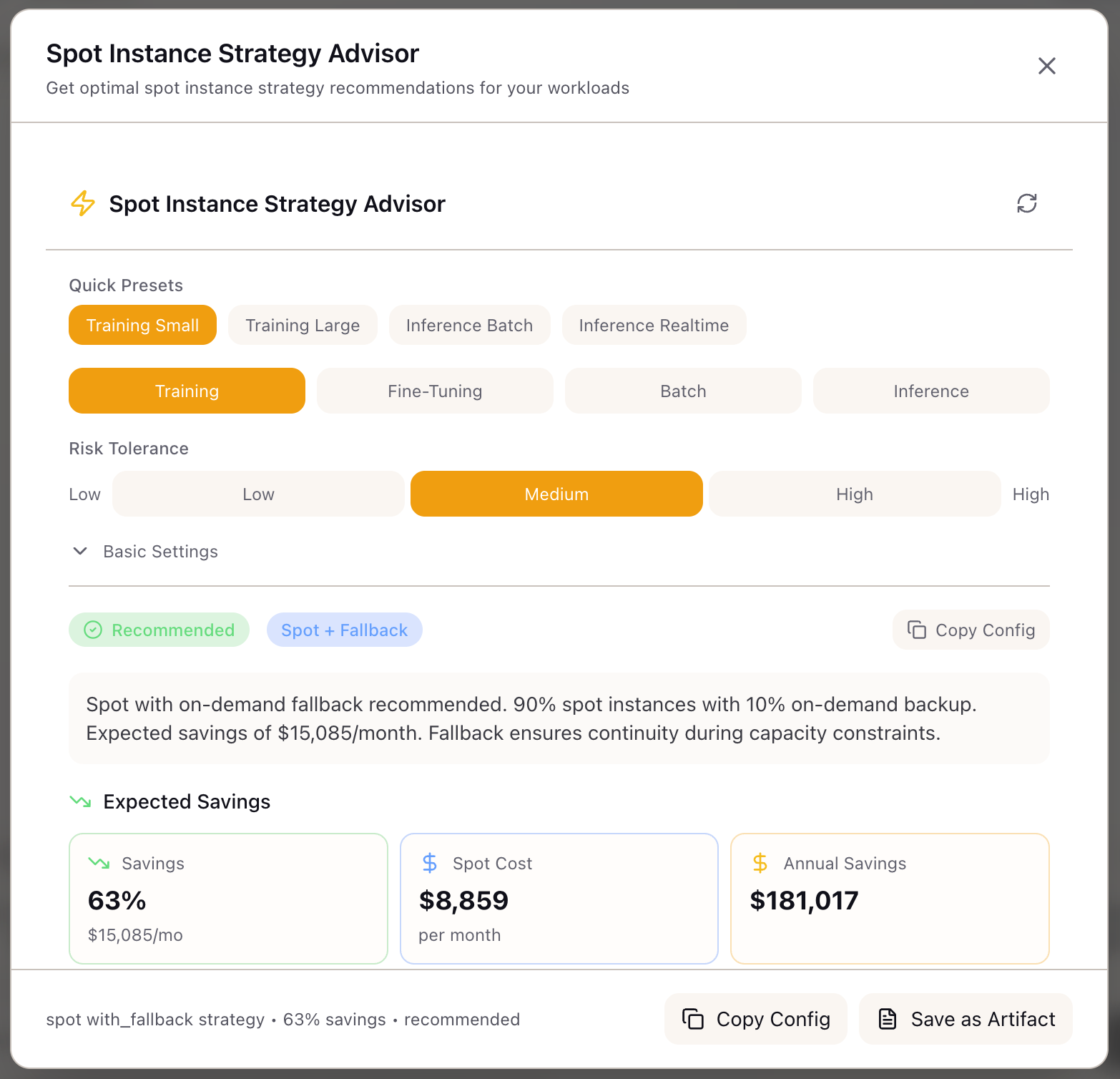
When I need to reduce GPU compute costs, I want to understand which workloads are suitable for spot instances and how to configure them safely, so I can cut costs by 60-70% without losing training progress to interruptions.
The Challenge
Spot instances offer 60-70% savings on GPU compute, but using them for ML workloads requires careful planning. A training job interrupted at 95% completion wastes days of compute. An inference endpoint that loses capacity during a traffic spike causes service degradation. A batch job that restarts from scratch on every interruption never finishes.
The decision isn’t binary—spot vs on-demand. The real question is: what percentage of your fleet should be spot, how do you handle interruptions, and which workloads are suitable? The answer depends on workload characteristics, risk tolerance, and cloud-specific interruption patterns.
Most teams either avoid spot entirely (leaving savings on the table) or adopt it naively (and learn the hard way about interruption frequency). Neither approach optimizes the cost-reliability tradeoff. What’s needed is a systematic framework for spot strategy that accounts for workload suitability, checkpointing requirements, and fleet composition.
How Lattice Helps
The Spot Instance Advisor analyzes your workload characteristics and recommends the optimal spot strategy. Instead of guessing whether spot makes sense, you get a viability assessment with specific savings estimates, checkpointing configurations, and fleet compositions tailored to your use case.
The advisor doesn’t just say “use spot”—it tells you how. Pure spot for fault-tolerant batch jobs. Spot with fallback for training runs. Mixed fleet for production inference. On-demand for latency-sensitive endpoints. Each recommendation includes the reasoning, so you understand the tradeoffs you’re making.
Configuring Your Workload
Workload Type:
Select your primary workload:
| Type | Description | Typical Spot Suitability |
|---|---|---|
| Training | Pre-training or continued training | Excellent (checkpointable) |
| Fine-tuning | LoRA, SFT, or full fine-tuning | Excellent (shorter duration) |
| Batch | Offline inference, embeddings | Excellent (stateless, retryable) |
| Inference | Real-time serving | Poor to Good (latency-dependent) |
Risk Tolerance:
Choose your risk comfort level:
| Level | Description | Recommended Strategy |
|---|---|---|
| High | Accept interruptions, prioritize savings | Pure spot (100%) |
| Medium | Balance savings with reliability | Spot with fallback (90/10) |
| Low | Minimize disruption risk | Mixed fleet (70/30) |
GPU Configuration:
- Cloud Provider: AWS, GCP, or Azure
- GPU Type: H100, A100 40GB, A100 80GB, A10G, L4
- GPU Count: 1-256 GPUs
Training Settings (for training workloads):
- Duration: Expected training time (hours/days)
- Checkpoint Size: Model checkpoint size in GB
- Checkpoint Frequency: How often you can checkpoint
Inference Settings (for inference workloads):
- Latency Sensitive: Requires consistent P99 latency
- Cold Start Tolerant: Can handle scale-up delays
Understanding the Recommendations
Viability Assessment:
The advisor provides a top-level assessment:
| Viability | Meaning | Action |
|---|---|---|
| Recommended | Excellent fit for spot | Proceed with confidence |
| Possible | Workable with precautions | Review warnings carefully |
| Not Recommended | Poor fit for spot | Use on-demand |
Strategy Recommendation:
| Strategy | Spot % | Use Case |
|---|---|---|
| Pure Spot | 100% | Batch jobs, fault-tolerant training |
| Spot with Fallback | 90% | Training with checkpoint recovery |
| Mixed Fleet | 70% | Production inference with reliability needs |
| On-Demand | 0% | Latency-sensitive real-time serving |
Savings Overview:
Savings vs On-Demand: 65%Monthly On-Demand Cost: $22,783Monthly Spot Cost: $7,974Annual Savings: $177,708Fleet Configuration:
Strategy: Spot with Fallback (90/10)Spot Instances: 90%On-Demand Fallback: 10%Grace Period: 120 secondsDiversification: capacity-optimizedInterruption Risk:
| Metric | Value |
|---|---|
| Frequency | Occasional (1-2 per week) |
| Warning Time | 120 seconds |
| Availability | 94% |
| Mitigation | Auto-retry, checkpoint resume |
Checkpointing Configuration (for training):
Checkpoint Interval: 30 minutesStorage: s3://checkpointsResume Time: ~5 minutesStorage Cost: $45/monthWorkload Suitability Scores
The advisor shows suitability scores for each workload type:
| Workload | Score | Reasoning |
|---|---|---|
| Training | 95% | Checkpointing enables graceful recovery |
| Batch | 98% | Stateless, easily retried on interruption |
| Inference | 45% | Latency sensitivity conflicts with spot volatility |
Technical Deep Dive
Strategy Selection Algorithm
The advisor uses a decision tree based on workload suitability and risk tolerance:
if suitability == "excellent":    if risk_tolerance == "high":        return "pure_spot"    elif risk_tolerance == "medium":        if interruption_frequency == "rare":            return "pure_spot"        else:            return "spot_with_fallback"    else:  # low risk        return "mixed_fleet"
elif suitability == "good":    if risk_tolerance == "high":        return "spot_with_fallback"    else:        return "mixed_fleet"
elif suitability == "moderate":    if risk_tolerance == "high":        return "mixed_fleet"    else:        return "on_demand"
else:  # poor    return "on_demand"
Workload Suitability Scoring
Training workloads score based on:
- Base score: 95 (highly checkpointable)
- Long duration penalty: -10 for runs > 7 days (cumulative interruption exposure)
- Large cluster penalty: -15 for > 64 GPUs (capacity constraints)
Batch workloads score based on:
- Base score: 98 (stateless, retryable)
- No significant penalties (naturally fault-tolerant)
Inference workloads score based on:
- Base score: 70 (moderate fit)
- Latency sensitivity penalty: -40 (conflicts with spot volatility)
- Cold start intolerance penalty: -20 (scale-up delays on interruption)
Savings Calculation
on_demand_monthly = gpu_hourly_rate x gpu_count x 730 hoursspot_discount = get_spot_discount(gpu_type)  # 55-70% depending on GPU
strategy_effectiveness = {    "pure_spot": 1.0,    "spot_with_fallback": 0.90,    "mixed_fleet": 0.70,    "on_demand": 0.0}
effective_discount = spot_discount x strategy_effectiveness[strategy]spot_monthly = on_demand_monthly x (1 - effective_discount)monthly_savings = on_demand_monthly - spot_monthly
Spot discount by GPU type:
| GPU | Spot Discount |
|---|---|
| H100 80GB | ~65% |
| A100 80GB | ~70% |
| A100 40GB | ~70% |
| A10G | ~60% |
| L4 | ~55% |
Real-World Scenarios
A research team training a 70B model configures the advisor with 8x H100, 7-day duration, and medium risk tolerance. The advisor recommends “spot with fallback” at 90/10 split, with 30-minute checkpoint intervals. Estimated savings: $402K annually. The team implements checkpoint-to-S3 and automatic resume, completing training with only 2 interruptions that added 15 minutes total.
A platform team running nightly embedding jobs selects batch workload with high risk tolerance. The advisor recommends “pure spot” at 100%. Jobs occasionally restart from interruption, but at 70% savings and with idempotent retry logic, the economics are compelling. They save $180K annually on embedding compute.
An ML engineering team serving a RAG endpoint selects inference workload with latency sensitivity enabled. The advisor returns “not recommended” for spot with this configuration. When they disable latency sensitivity (acceptable for their internal tool), viability changes to “possible” with a mixed fleet recommendation. They implement the 70/30 split with auto-scaling fallback, achieving 40% cost reduction with acceptable latency variance.
What You’ve Accomplished
You now have a systematic approach to spot instance strategy:
- Assess workload suitability with objective scoring
- Choose risk tolerance that matches your constraints
- Get specific fleet configurations with savings estimates
- Configure checkpointing for safe recovery
What’s Next
The Spot Instance Advisor integrates with other Lattice cost tools:
- TCO Calculator: Factor spot savings into API vs self-hosted analysis
- Memory Calculator: Verify GPU memory fits model before spot recommendation
- Accelerator Registry: Browse spot-eligible GPU options across providers
- Training Scenarios: Apply spot configuration to training scenario definitions
Spot Instance Advisor is available in Lattice. Optimize your GPU spend with confidence.
Ready to Try Lattice?
Get lifetime access to Lattice for confident AI infrastructure decisions.
Get Lattice for $99