
Understanding the Three-Panel Layout
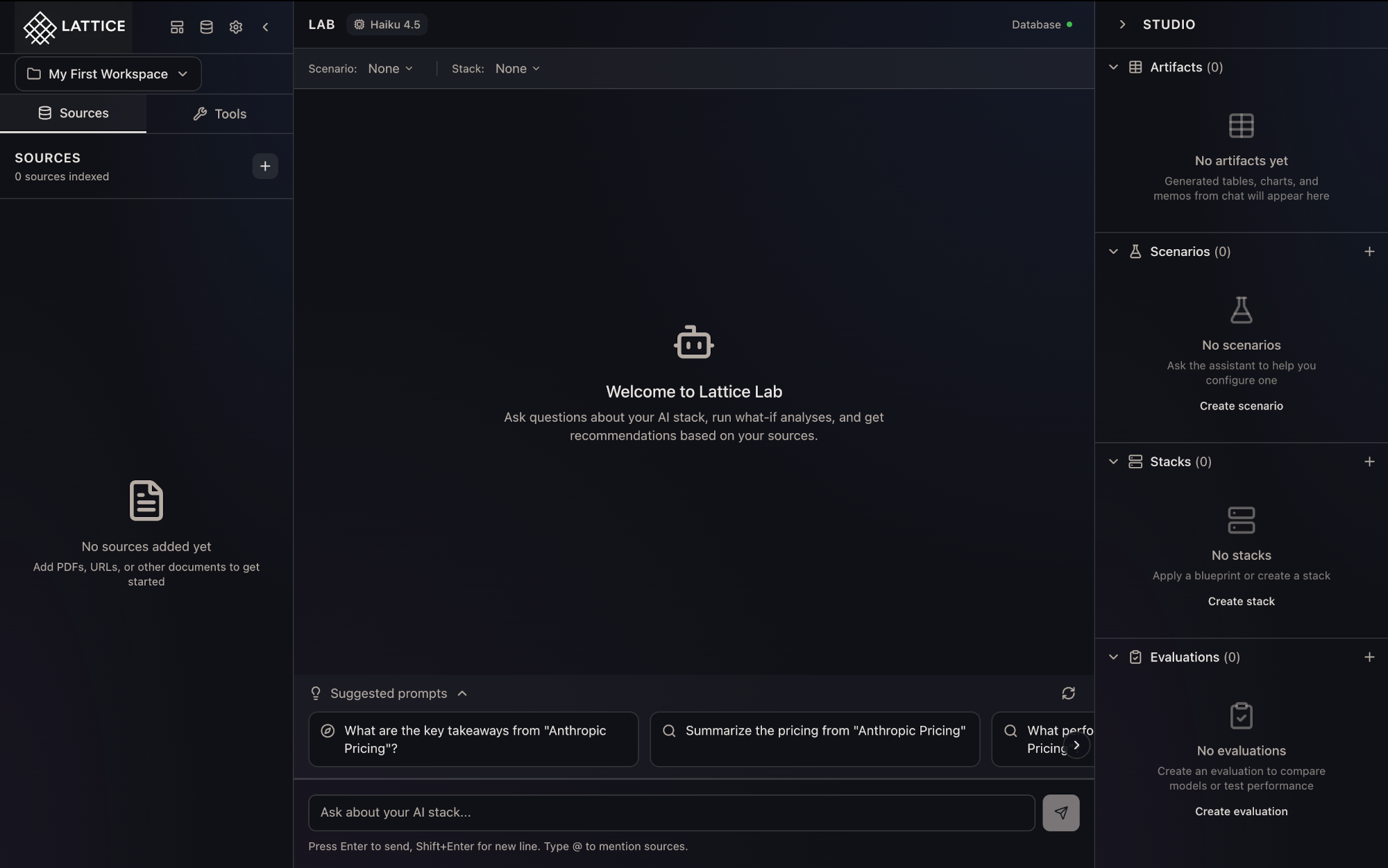
When I start researching AI infrastructure options, I want to have my sources, conversation, and artifacts visible together, so I can make decisions without constant context-switching.
Introduction
Research engineers and platform leads making infrastructure decisions face a common challenge: information fragmentation. Your requirements doc lives in one tab, the vendor pricing page in another, your notes in a third, and the AI chat in a fourth. Every question requires reconstructing context from scattered sources.
Lattice’s three-panel layout eliminates this friction by co-locating everything you need for infrastructure research in a single view.
The Three Panels
Sources Panel (Left)
The Sources panel is your knowledge base. Upload PDFs of research papers, paste URLs to vendor documentation, or import GitHub repositories with implementation examples. Each source gets chunked, embedded, and indexed for semantic search.
Sources are organized by category—Requirements, Research, Vendor Docs, Benchmarks—so you can quickly find relevant documents. When you’re deep in a conversation about GPU memory requirements, your training documentation is one glance away.
Key capabilities:
- Multi-format support: PDFs, URLs, GitHub repos, YouTube transcripts
- Automatic indexing: Content is chunked and embedded for semantic search
- Category organization: Filter by source type for focused research
- Chunk indicators: See how much searchable content each source contains
Lab Panel (Center)
The Lab is where research happens. This is your conversation with Lattice’s Research Agent—but it’s more than a chat window. Every response shows thinking steps, so you can see exactly how the agent reasoned from your sources to its conclusions.
When the agent cites a benchmark or references a paper, those citations appear as interactive pills. Hover to see the relevant snippet; click to jump to the source. No more “where did that number come from?” moments during stakeholder reviews.
Key capabilities:
- Transparent reasoning: Expandable thinking steps show the agent’s logic
- Interactive citations: Every claim links back to source documents
- Context awareness: The agent knows your scenario and stack configuration
- Smart prompts: Context-aware suggestions based on your research state
Studio Panel (Right)
The Studio is where decisions crystallize. Every comparison table, cost calculation, and architecture diagram generated during your research appears here as a reusable artifact.
Artifacts aren’t just chat outputs—they’re filterable and exportable. When you generate a “Claude vs GPT-4 for code generation” comparison today and need to update it next month, the artifact is waiting in your Studio.
Key capabilities:
- Artifact library: All generated analyses in one place
- Scenario management: Configure and switch between workload definitions
- Stack configuration: Define hardware and software stack options
- Export options: Markdown export for design docs and presentations
Responsive Design
The layout adapts to your device and focus:
- Desktop: All three panels visible, with resizable and collapsible options
- Tablet: Sources and Lab panels visible, Studio accessible via toggle
- Mobile: Lab panel only, with navigation to Sources and Studio
This recognition that deep research happens on large screens, but quick questions happen everywhere.
Why It Matters
The three-panel layout isn’t just a UI pattern—it’s a workflow architecture. By keeping sources, conversation, and artifacts visible together, it reduces the cognitive overhead of infrastructure research.
When finance asks for a TCO comparison, you’re not reconstructing context from memory—everything is at your fingertips. When a colleague questions your GPU choice, you’re pointing to a versioned artifact with citations, not hunting through chat history.
What’s Next
The three-panel layout is the foundation for Lattice’s expanding capabilities:
- Workspace Management: Multiple isolated research contexts, each with their own sources and artifacts
- Blueprint Gallery: Pre-built knowledge bundles that populate your Sources panel instantly
- @ Mentions: Reference specific sources or artifacts in chat with autocomplete
The three-panel layout is available in Lattice 0.1.0. Start your AI infrastructure research with a workspace designed for how you actually work.
Ready to Try Lattice?
Get lifetime access to Lattice for confident AI infrastructure decisions.
Get Lattice for $99