
Configuring Spot Instance Strategy
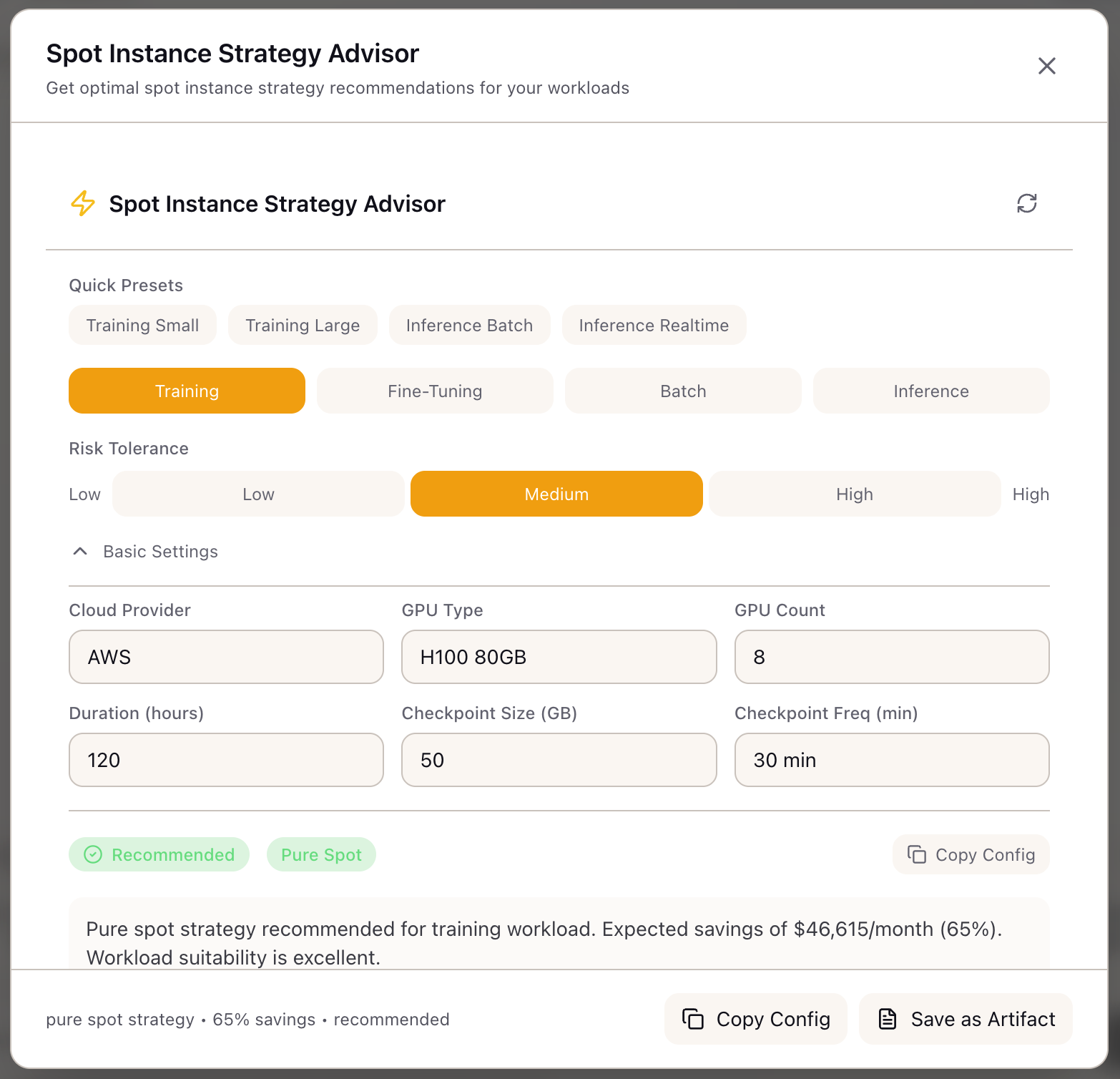
When I need to run a multi-day training job on a budget, I want to configure spot instances with proper checkpointing, so I can cut costs by 50-60% without losing training progress to interruptions.
The Challenge
Your TCO analysis shows self-hosted training makes sense at your volume. The next question: how do you actually implement it without burning money on on-demand instances? Spot instances offer 60-70% savings, but the “spot” in spot instances means they can disappear with 2 minutes notice. For a 5-day training run, that’s not an inconvenience—it’s a project killer without proper planning.
The naive approach is to just launch spot instances and hope for the best. The sophisticated approach involves checkpoint configuration, fleet diversification, fallback strategies, and interruption handling—all while keeping the economics favorable. Getting this right saves $100K+ annually on a typical training workload. Getting it wrong means lost compute, failed runs, and frustrated engineers.
This walkthrough shows how to use the Spot Instance Advisor to configure a production-ready spot strategy for training, from workload assessment through checkpoint configuration to fleet composition.
The Starting Point: Your Training Setup
You’re the ML infrastructure lead planning compute for a 70B model training run:
- Model: 70B parameters, requiring 8x H100 GPUs
- Duration: 5 days estimated (120 hours)
- Checkpoint Size: 280 GB (full model state)
- Budget Pressure: Leadership wants to cut the $57K compute bill
- Constraint: Can’t afford to lose more than 4 hours of training progress
Your goal: reduce costs by 50%+ while maintaining reliable training completion.
Step 1: Assess Workload Suitability
Open the Spot Instance Advisor from the Tools section in the Studio panel.
Select your workload type:
- Click Training in the workload selector
- The advisor marks training as “Excellent” suitability (95% base score)
Review the suitability reasoning:
Training suitability: 95%- Highly checkpointable workload- Can resume from last checkpoint on interruption- Proven pattern in large-scale training runs
Note: Long duration (>7 days) or large clusters (>64 GPUs)may reduce suitability due to cumulative interruption exposure.
Your 5-day run and 8-GPU cluster are well within the optimal range.
Step 2: Configure Risk Tolerance
Select your risk tolerance:
Consider your constraints:
- You can’t afford to lose >4 hours of progress
- But you need significant cost savings
- You have engineers who can monitor the run
- Select Medium risk tolerance
The advisor explains what this means:
Medium Risk Tolerance:- Expects occasional interruptions (1-2 per week)- Willing to accept 5-15 minute recovery windows- Prefers spot savings with reliability safety net- Recommended strategy: Spot with Fallback (90/10)Step 3: Configure GPU and Training Parameters
Set GPU configuration:
- Select Cloud Provider: AWS
- Select GPU Type: H100 80GB
- Set GPU Count: 8
Set training duration:
- Set Duration: 120 hours (5 days)
Set checkpoint configuration:
- Set Checkpoint Size: 280 GB
- Set Checkpoint Frequency: 30 minutes (your current setting)
The advisor calculates based on your inputs.
Step 4: Review the Strategy Recommendation
The advisor returns its recommendation:
Viability: Recommended
Strategy: Spot with Fallback (90/10)
Fleet Composition:- Spot Instances: 90% (7.2 GPU equivalents)- On-Demand Fallback: 10% (0.8 GPU equivalents)
Fallback Behavior:- Grace period: 120 seconds- Auto-failover on spot interruption- Resume from checkpoint automatically
Why not pure spot? The advisor explains:
With medium risk tolerance and 120-hour duration,pure spot (100%) carries 94% cumulative interruptionprobability. Spot with fallback provides 90% of thesavings while guaranteeing compute availabilityduring checkpoint recovery.Step 5: Review Savings Analysis
Cost Comparison:
| Metric | On-Demand | Spot Strategy |
|---|---|---|
| Hourly Cost | $786.56 | $314.62 |
| 5-Day Cost | $47,194 | $18,877 |
| Monthly Cost | $574,186 | $229,674 |
| Annual Savings | - | $4.1M |
Savings Breakdown:
Base H100 Spot Discount: 65%Strategy Effectiveness: 90% (due to 10% fallback)Effective Discount: 58.5%
Your savings: $28,317 on this training runAnnualized (if continuous training): $4.1M
Step 6: Configure Checkpointing
The advisor provides checkpointing recommendations:
Checkpoint Configuration:
Recommended Interval: 30 minutes  (Matches your setting - optimal for spot interruption warning)
Storage: s3://your-bucket/checkpoints/  - S3 Standard for fast resume  - Lifecycle: Delete after 30 days
Resume Time: ~5 minutes  (280 GB at 1 GB/s restore speed)
Storage Cost: $65/month  (280 GB x multiple versions)
Why 30 minutes?
Spot interruption warning: 120 secondsCheckpoint save time: ~3 minutes for 280 GBRecovery time: ~5 minutes
With 30-minute intervals, maximum lost work is 30 minutes.Your constraint (4 hours max loss) is easily met.
Shorter intervals (15 min) add checkpoint overhead.Longer intervals (60 min) risk more lost work.
Step 7: Review Interruption Risk
Risk Assessment:
| Metric | Value |
|---|---|
| Interruption Frequency | Occasional (1-2 per week) |
| Warning Time | 120 seconds |
| Spot Availability | 94% for H100 |
| Cumulative Probability (5 days) | ~3 interruptions expected |
Mitigation Strategies:
- Automatic checkpoint on SIGTERM: Catch the 2-minute warning
- Multi-AZ deployment: Spread across availability zones
- CloudWatch alerts: Notify on interruption events
- Async checkpoint to S3: Don’t block training for checkpoint I/O
Step 8: Review Fleet Configuration
Diversification Strategy: capacity-optimized
Instance Types: [p5.48xlarge]  - H100 instances for your GPU requirement
Availability Zones: [us-east-1a, us-east-1b, us-west-2a]  - Multi-AZ reduces correlated interruptions
Spot Pool Selection: capacity-optimized  - Prioritizes pools with highest availability  - Lower interruption rate than lowest-price
Why capacity-optimized over lowest-price?
For training workloads, consistency matters more thanmarginal price differences. Capacity-optimized selectsfrom pools with the most available capacity, reducinginterruption frequency by 20-40% vs lowest-price strategy.Step 9: Export and Implement
Save as Artifact:
- Click Save as Artifact in the modal header
- The artifact captures the complete recommendation
Copy Config: Click Copy Config to get the fleet configuration JSON for your infrastructure automation.
Step 10: Implement the Strategy
With your configuration exported, implement in your training infrastructure:
1. Configure checkpoint handler:
import signal
def checkpoint_on_sigterm(signum, frame):    print("Received SIGTERM - saving checkpoint")    trainer.save_checkpoint("s3://checkpoints/emergency/")    sys.exit(0)
signal.signal(signal.SIGTERM, checkpoint_on_sigterm)
2. Configure AWS Spot Fleet:
SpotFleetRequestConfig: AllocationStrategy: capacityOptimized TargetCapacity: 8 OnDemandTargetCapacity: 1 # 10% fallback LaunchTemplateConfigs: - LaunchTemplateSpecification: LaunchTemplateId: lt-xxx Overrides: - InstanceType: p5.48xlarge AvailabilityZone: us-east-1a - InstanceType: p5.48xlarge AvailabilityZone: us-east-1b3. Configure checkpoint schedule:
# In your training loopif step % checkpoint_interval == 0: trainer.save_checkpoint(f"s3://checkpoints/step-{step}/")Real-World Patterns
Pattern: Validating Before Long Runs
Before committing to a 5-day run:
- Run a 4-hour test with spot strategy
- Verify checkpoint save/restore works
- Confirm interruption handling triggers correctly
- Monitor actual interruption frequency vs predicted
Pattern: Adjusting for High-Priority Runs
For critical deadline-driven training:
- Increase fallback percentage (70/30 mixed fleet)
- Reduce checkpoint interval to 15 minutes
- Accept 40% savings instead of 58% for more reliability
Pattern: Batch Inference Optimization
For embedding generation or batch inference:
- Select “Batch” workload type (98% suitability)
- Choose “High” risk tolerance (stateless, retryable)
- Use “Pure Spot” strategy (100%)
- No checkpointing needed—just retry failed batches
What You’ve Accomplished
You now have a production-ready spot strategy:
- Assessed workload suitability (95% for training)
- Configured fleet composition (90/10 spot/on-demand)
- Set checkpoint intervals optimized for interruption recovery
- Estimated savings: $28K per 5-day run, $4.1M annually
What’s Next
Your spot strategy feeds into other Lattice tools:
- TCO Calculator: Update self-hosted costs with actual spot pricing
- Stack Configuration: Apply spot fleet settings to infrastructure stack
- Training Scenarios: Save spot configuration as part of training scenario
- Memory Calculator: Verify checkpoint memory doesn’t exceed GPU capacity
Spot Instance Advisor is available in Lattice. Cut your training costs in half without cutting corners.
Ready to Try Lattice?
Get lifetime access to Lattice for confident AI infrastructure decisions.
Get Lattice for $99